Environments, side by side.
See the latest deployment for each application in every environment you choose. Custom names, custom order. No fixed Dev-to-Prod template.
YOUR AZURE DEVOPS DESKTOP COMPANION
From the latest build to production.
Your applications and environments, in one calm view.
Microsoft sign-in · Your own workspace · No personal access tokens
Environment overview
+Build context
+Desktop notifications
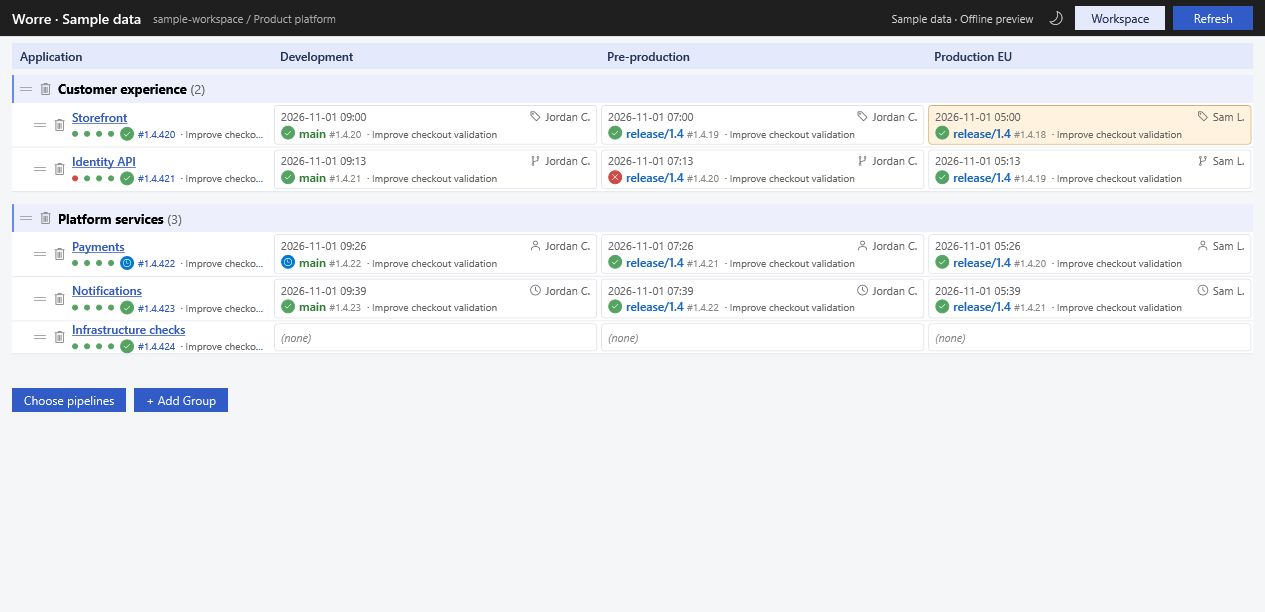
See the latest deployment for each application in every environment you choose. Custom names, custom order. No fixed Dev-to-Prod template.
Branch, deployment time, status and the associated user or approver. See recent build results and jump straight to the Azure DevOps run.
Refresh on your schedule and get desktop notifications when deployments change. Cached history makes later refreshes incremental.
FROM SIGN-IN TO SIGNAL
Worre reads the projects your Microsoft work account can access. Your build and deployment data stays on your computer and in Azure DevOps.
Make room on your desktop ↗Secure browser login with Entra OAuth. No token to create, copy or maintain.
Discover your project, select environments, rename their labels and arrange the columns.
Select build pipelines, group applications and make the dashboard yours. Build-only pipelines work too.
A DIFFERENT VIEW OF DELIVERY
Keep Azure DevOps for the work itself. Keep Worre beside it for the overview.
| Your tool | Its focus | Where it fits |
|---|---|---|
| Azure DevOps | Your engineering workspace | Configure pipelines, inspect runs and manage delivery. |
| CatLight | A developer action center | Prioritized build, release, pull request and issue alerts. |
| Worre | What's running where | A desktop application × environment matrix, with build context and deployment notifications. |
CatLight also supports release monitoring and notifications. Its workflow is described in CatLight’s official feature guide ↗. Reviewed 31 October 2026.
FIT YOUR TEAM, YOUR DESKTOP
Choose light or dark. Name your dashboard. Group and reorder applications. Set refresh frequency and history depth. Export workspace preferences without exporting credentials.
AVAILABLE FOR WINDOWS
Download Worre, connect your work account and build your own deployment view.
Download for Windows x64v0.9.2086 preview · Windows 10 / 11 · No .NET installation required
Signed release manifest ↗Need a look first? Choose Try sample data in the setup window.
The installer and application are digitally signed by Binair using Azure Artifact Signing. Updates also use a signed manifest and package checksum. Windows may still show SmartScreen reputation prompts for a new application.
Azure DevOps Services and Microsoft Entra work accounts are supported. Administrator consent may be required. Deployment history uses Azure DevOps Environments; classic releases and on-premises Azure DevOps Server are not currently supported.